AI and LinkedIn Automation Compliance
Use AI-powered LinkedIn automation safely by following strict limits, personalizing outreach, and running regular compliance audits.

AI and LinkedIn Automation Compliance
LinkedIn automation tools powered by AI can save time and boost outreach results, but they come with risks. LinkedIn strictly prohibits automated tools, as outlined in its User Agreement, and uses advanced detection methods to enforce these rules. Violations can lead to warnings, restrictions, or permanent bans.
Here’s how you can use LinkedIn automation responsibly:
- Stay within LinkedIn automation limits: Keep weekly connection requests under 80–100 and total daily automated actions below 250.
- Personalize messages: Avoid generic templates; tailor outreach to each prospect.
- Mimic human behavior: Randomize actions, timing, and daily activity patterns.
- Monitor account health: Watch for signs like CAPTCHA challenges or declining connection acceptance rates.
- Respect privacy laws: Ensure compliance with GDPR and CCPA when handling data.
Tools like SalesMind AI can help manage compliance by implementing features like rate limiting, personalized messaging, and gradual activity scaling. Regular audits and a compliance-first strategy are key to protecting your LinkedIn account while optimizing outreach efforts.
Key takeaway: Stick to LinkedIn’s rules, focus on quality over quantity, and use compliant tools to balance efficiency with account safety.
How to Use AI and Automation on LinkedIn Without Getting Banned
sbb-itb-817c6a5
LinkedIn's Automation Policies Explained
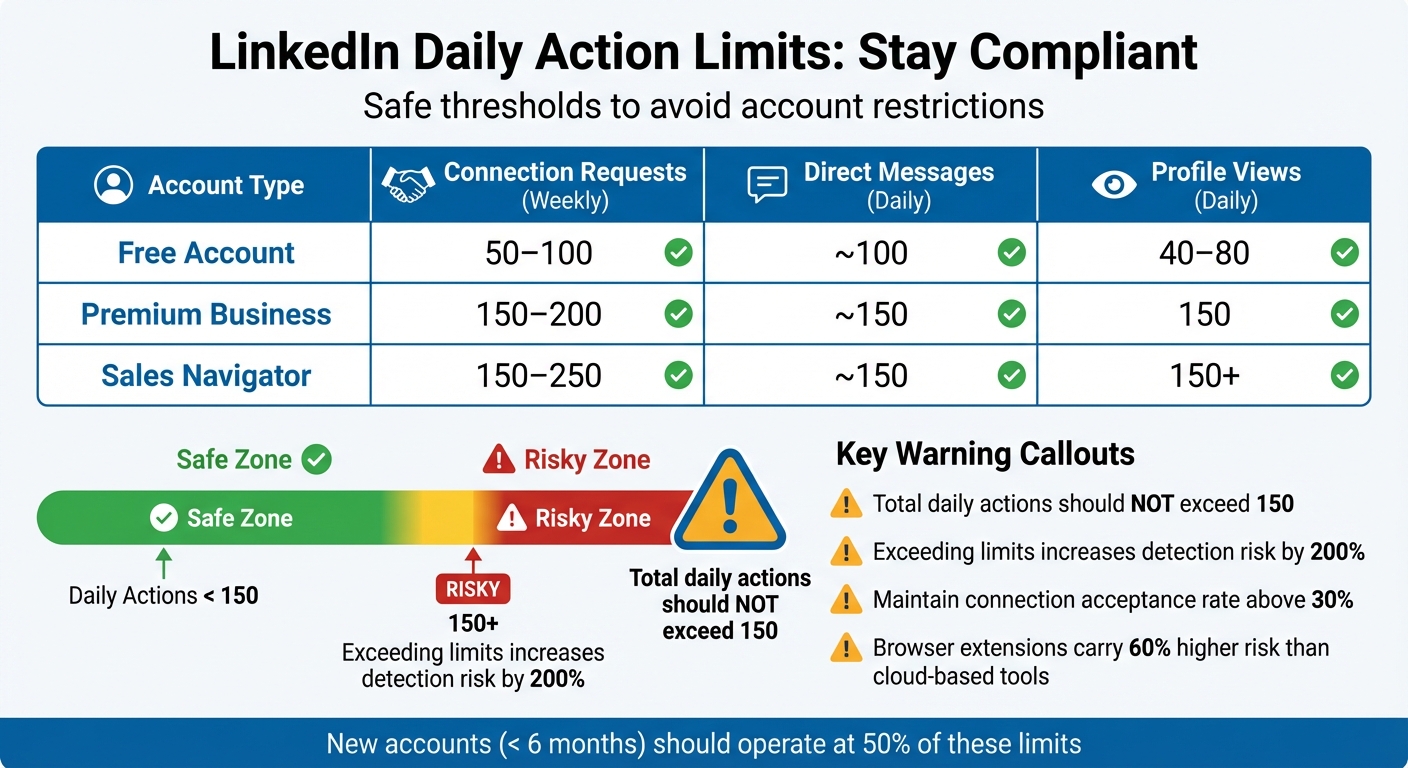
LinkedIn Daily Action Limits by Account Type: Safe Thresholds for Automation Compliance
Why LinkedIn Limits Automation
LinkedIn enforces strict limits on automation for a few key reasons. First, it aims to reduce spam and bot activity, which can overwhelm users with irrelevant and unsolicited messages. Second, these restrictions help preserve the quality of interactions on the platform, encouraging genuine, personalized engagement instead of generic mass outreach [5]. Finally, LinkedIn safeguards its revenue by pushing users toward premium features like Sales Navigator and InMail, rather than relying on free automation tools [2].
"To maintain a platform for authentic interactions, we don't allow the use of third-party software, browser extensions, or other tools that scrape, modify the appearance of, or automate activity on LinkedIn's website." - LinkedIn Official Policy [3]
LinkedIn has significantly advanced its detection methods over the years. Between 2023 and 2025, the platform's ability to spot automation tools improved by a staggering 340% [3]. This is largely thanks to AI-driven systems that analyze user behavior, timing, session lengths, and device fingerprints [7]. Additionally, LinkedIn assigns a "Trust Score" to profiles, which measures engagement effectiveness. For example, if you send 50 connection requests but only 5 are accepted, your Trust Score drops. A low score can make your outreach efforts practically invisible [7].
These detection technologies directly influence the daily limits LinkedIn imposes on user activity.
Daily Action Limits You Need to Know
LinkedIn's policies and advanced detection systems have led to specific action limits to avoid restrictions, even though the platform doesn't officially disclose these numbers. Extensive user testing has revealed safe ranges, which vary depending on the age and type of your account. For instance, new accounts (less than 6 months old) face stricter limits, operating at 50% of the thresholds for more established accounts with better engagement rates [4][1].
| Account Type | Connection Requests (Weekly) | Direct Messages (Daily) | Profile Views (Daily) |
|---|---|---|---|
| Free Account | 50–100 | ~100 | 40–80 |
| Premium Business | 150–200 | ~150 | 150 |
| Sales Navigator | 150–250 | ~150 | 150+ |
To stay under LinkedIn's radar, the total number of actions (including views, likes, follows, and messages) should not exceed 150 per day [5]. Going beyond these limits can increase your chances of detection by 200% [3]. Maintaining a connection acceptance rate above 30% is also crucial. If your rate falls below 20–30%, LinkedIn's safety algorithms may flag your account, further lowering your Trust Score [6].
It's worth noting that browser extensions pose a higher risk - up to 60% greater - compared to cloud-based automation tools. This is because LinkedIn can detect real-time changes made to its interface through browser extensions [3][7].
5 Core Principles of Compliant AI-Powered LinkedIn Automation
To navigate LinkedIn's strict rules while effectively engaging prospects, it's important to follow these five principles. They ensure compliance while helping you craft meaningful, personalized outreach.
Principle 1: Personalized AI Messaging
LinkedIn's algorithms are quick to flag spam-like behavior, such as sending out identical messages in bulk. Real personalization means more than just personalizing LinkedIn connection requests - it involves tailoring messages based on details like their role, industry, or recent activity. For example, instead of a generic "Hi [First Name]", you could reference a recent post they shared about industry trends or mention their company's recent growth.
Avoid including links in your first message, as LinkedIn may throttle messages that contain them. Save links for later in the conversation. Also, wait 24–72 hours after a connection request is accepted before reaching out. This delay mimics natural behavior and reduces the chance of being flagged.
Principle 2: Rate Limiting and Natural Behavior Patterns
To stay under LinkedIn's radar, your automation must mimic human behavior. For instance, bots often operate on fixed schedules, but humans are inconsistent. LinkedIn monitors "action velocity", so sending 30 requests in 10 minutes could trigger detection [9]. Instead, vary your daily activities. One day, you might send 18 connection requests; the next, only 12. Randomize your activity times and add delays of 3–8 minutes between actions to appear more natural.
| Activity | Safe Daily Limit | Risky Zone | Excessive Use |
|---|---|---|---|
| Connection Requests | 15–20 | 30–50 | 100+ |
| Messages Sent | 20–30 | 50–75 | 100+ |
| Profile Visits | 50–80 | 100–150 | 200+ |
| Comments Posted | 20–30 | 40–60 | 100+ |
| Post Likes | 100–150 | 200–300 | 500+ |
Take breaks from automation for a day or two each week and reduce activity during holidays. Mixing up your actions - such as liking posts, commenting, and sending messages - also helps. Keep your total automated actions below 250 per day for added safety [1].
Principle 3: Honest and Clear Outreach
Being transparent in your outreach builds trust and keeps you compliant. Always be upfront about why you're reaching out and what you can offer. Avoid pretending to know someone or referencing unverified mutual connections. Engaging with a prospect's content - like commenting on their posts - before messaging them shows genuine interest and reduces the risk of being flagged. Using tools that require manual approval of AI-suggested messages also helps maintain a human touch [9]. Honest communication boosts your credibility and strengthens your Trust Score.
Principle 4: Data Privacy and GDPR/CCPA Requirements
Respecting data privacy is non-negotiable. LinkedIn's User Agreement explicitly bans bots, scripts, or scrapers that access or copy profile data [1][8]. If you're collecting prospect information, ensure compliance with regulations like GDPR and CCPA. Use clear consent mechanisms, provide easy opt-out options, and only store the data you truly need. Whenever possible, stick to LinkedIn's native tools like Sales Navigator or the post scheduler, which eliminate the risk of violating LinkedIn's rules.
Principle 5: Regular Account Health Checks
Monitoring your account regularly can help you spot issues early. Signs like frequent CAPTCHA challenges, unusual activity alerts, or slower page loading times could mean LinkedIn is flagging your actions [8]. If this happens, immediately reduce your automation volume by 50%. Aim to maintain a connection acceptance rate above 30%, as this shows your outreach is well-targeted. If your account faces restrictions, pause all automation for 2–3 weeks, switch to manual actions, and gradually resume automation at a lower volume. Restrictions typically last 7–30 days [9]. Balancing automated actions with organic engagement, like posting content and interacting manually, helps protect your account and ensures long-term success.
How to Use SalesMind AI While Staying Compliant
SalesMind AI is built to align with LinkedIn's compliance standards, offering tools that automate outreach in a way that minimizes risks. A key feature is the assignment of a dedicated IP address for each profile, which mimics natural user behavior and reduces the likelihood of account restrictions. Additionally, it randomizes the timing of actions - ensuring at least a five-minute gap between them - and schedules outreach to match the local business hours of your prospects. This prevents sudden activity spikes that LinkedIn's detection systems might flag as suspicious [10].
The platform also takes a gradual approach to connection requests. Instead of overwhelming LinkedIn with sudden increases, SalesMind AI starts small and scales up incrementally. As their documentation notes, "Sudden jumps in connection requests (e.g., 1 today, 60 tomorrow) raise red flags." This method not only protects your account but also fosters steady growth [10]. By mirroring natural traffic patterns, SalesMind AI creates a seamless and compliant outreach process.
Another standout feature is the unified inbox, which centralizes all LinkedIn responses. This makes it easier to manage conversations, whether you're replying manually or using AI-assisted suggestions. Combined with advanced lead scoring - which prioritizes prospects scoring above 70 - SalesMind AI helps you focus on meaningful, personalized engagement. With ratings like 4.4/5 on Trustpilot, 4.7/5 on G2, and a perfect 5/5 on the Chrome Store, it’s clear that users value its compliance and effectiveness [11].
To ensure smooth operation, disable any other LinkedIn automation tools before activating SalesMind AI. Configure your outreach schedule to align with your audience's business hours, and use the platform's AI to craft tailored messages for each prospect. If LinkedIn flags your account, you may need to complete identity verification to regain access [10].
When it comes to privacy, SalesMind AI processes only publicly available LinkedIn data for its lead scoring and messaging features. Enterprise users benefit from additional tools like audit logs and GDPR/CCPA compliance measures, including auto-deletion of unresponsive leads after 30 days and consent tracking. As Rahul Pushkarna, Senior Advisor at Bounty Media, explains, "SalesMind AI has proven very useful to our sales team in reducing the massive pain points of manually tracking each and every lead interaction" [11]. With flexible pricing options, the platform scales to meet varying compliance needs.
SalesMind AI Features That Support Compliance
SalesMind AI includes several features designed to ensure compliance while optimizing outreach. These include:
- Advanced lead scoring: Helps you focus on high-quality prospects.
- Rate limiting: Caps daily actions to stay below LinkedIn's detection thresholds.
- AI-powered personalized messaging: Creates unique messages for each prospect, avoiding patterns that might look like spam.
These tools work together to maintain account safety and maximize your outreach efforts.
SalesMind AI Pricing Plans and Compliance Features
SalesMind AI offers three pricing tiers to accommodate different team sizes and compliance requirements:
- Basic Plan: $49/month ($468/year with a 20% annual discount). Includes basic lead scoring, AI messaging, and standard rate limits, with a cap of 50 leads per month. Ideal for solo users or small teams trying out LinkedIn automation.
- Professional Plan: $99/month ($948/year). Adds advanced lead scoring, a unified inbox, and custom delay settings between actions. Supports up to 200 leads per month. Florian Decludt from Clutch notes, "It's the best tool out there to curate your audience on autopilot while focusing on higher-leverage tasks" [11].
- Enterprise Plan: Starts at $299/month, with custom annual pricing. Offers comprehensive compliance tools like GDPR/CCPA features, API integrations, dedicated audits, and priority support. This plan is suited for larger organizations with unlimited lead capacity.
Pricing Comparison Table
| Plan Name | Price | Compliance Features | Limitations |
|---|---|---|---|
| Basic | $49/mo ($468/year) | Basic lead scoring, AI messaging, standard rate limits | 50 leads/month, no advanced analytics |
| Professional | $99/mo ($948/year) | Advanced lead scoring, unified inbox, custom action delays | 200 leads/month |
| Enterprise | $299+/mo (custom) | Full GDPR/CCPA compliance, API integrations, dedicated audits, priority support | Custom, scalable |
All plans include core compliance features like dedicated IP addresses, business hour scheduling, randomized timing, and gradual scaling of connection requests. Higher-tier plans provide more advanced tools for managing complex workflows across larger teams [10].
Running Regular Compliance Audits for AI Tools
Regular compliance audits are a must to keep automation practices safe and effective. LinkedIn's systems are constantly evolving, meaning what worked a few months ago could now lead to account restrictions. Conducting these audits quarterly can help you identify potential problems early, avoiding escalations like account suspensions. Focus on three main areas: behavioral velocity (sudden activity spikes), content integrity (patterns in AI-generated messages), and technical signals (such as IP address types and browser details).
LinkedIn's shift from simple volume monitoring to activity velocity tracking has changed the game. Take this example: In 2025, a FinTech SDR sent 80 connection requests daily using an automation tool. This dropped their acceptance rate to 15%. After pausing for seven days, manually engaging for a week, and gradually increasing requests starting at 10 per day, the rate recovered to 32% [12].
Audits should also cover semantic clustering - LinkedIn's ability to spot similar message structures across accounts. A SaaS company in early 2025 reached 5,000 prospects by segmenting territories to avoid overlaps and using AI to craft personalized intros tied to company news. They sent 4,800 messages without triggering any flags and booked meetings with 12% of their prospects [12].
Maintaining connection acceptance rates is critical. Falling below 20% can lead to restrictions, so aim for rates above 25% [12]. Centralized oversight, like using action logs and risk dashboards, can help spot potential issues before LinkedIn does [12].
Steps for an Effective Compliance Audit
Start by reviewing your action volume across key categories:
- 80 to 100 connection requests per week
- 50 to 70 first-degree messages per day
- 80 to 150 profile views per day
Keep total automated actions under 250 per day [1]. Watch for sudden spikes in activity - like jumping from 5 to 200 profile views overnight - which are clear red flags [1].
Next, check your engagement metrics. Monitor connection acceptance rates weekly, not just during quarterly reviews. If rates drop below 20%, pause your campaigns and investigate [1]. Also, scan replies for negative sentiment (e.g., requests to stop outreach) and set your campaigns to pause automatically when such feedback appears [12].
Evaluate your content strategy. Rotate message templates monthly or quarterly to avoid LinkedIn's duplicate content filters, which detect repetitive patterns. Require managerial approval for new AI-generated prompts and ensure they align with do-not-contact lists. Use AI tools that create varied messages to avoid detection through semantic clustering [12].
Finally, review your technical footprint. Ensure your tool mimics normal browser behavior:
- Use residential IP addresses instead of data center IPs
- Emulate standard browser headers (like User-Agent and screen resolution)
These steps help reduce detection risks [1][12]. Cloud-based tools are often safer than browser extensions since they avoid direct DOM manipulation [1].
Once your technical setup is solid, focus on maintaining account health. Clear pending connection requests older than two weeks to keep your profile clean [12]. Use dynamic throttling to stop automation at 80% of maximum limits, creating a safety buffer [12]. Balance automation with manual activities like posting and commenting to maintain authenticity [1]. For newer accounts or those recovering from restrictions (typically under six months old), cut all limits by half and gradually increase them over three to four weeks [1].
| Metric Category | What to Check | Safe Threshold |
|---|---|---|
| Connection Requests | Weekly total | 80–100 per week |
| 1st Degree Messages | Daily total | 50–70 per day |
| Profile Views | Daily total | 80–150 per day |
| Total Actions | Combined daily automated actions | < 250 per day |
| Acceptance Rate | Connection approval percentage | Above 25% (red flag if < 20%) |
| Pending Requests | Age of unanswered requests | Clear requests > 2 weeks old |
Document every warning, CAPTCHA prompt, or restriction your account encounters. For accounts with prior warnings, reduce automation volume by 30% immediately. If a restriction occurs, stop automation entirely, complete identity verification, and use the account manually for 1–2 weeks before resuming at half the original volume [1].
What's Next for LinkedIn AI Detection and Automation
LinkedIn's detection systems are stepping up their game, making it harder for automation tools to go unnoticed. The platform has moved past simply counting actions and now uses advanced behavioral analysis to spot patterns that might escape human attention. For instance, LinkedIn can detect overly precise timing and predictable sequences of actions - signs of bot-like behavior [13]. Looking ahead, LinkedIn plans to focus more on how users navigate. While humans browse in a varied and non-linear way, bots often follow repetitive, sequential patterns that are easier to flag [1].
The numbers tell a clear story: 23% of users relying on traditional automation tools face account restrictions within 90 days. Of those, 40–50% never fully recover their accounts, and 5–10% end up with permanent bans or flagged IP addresses [13]. LinkedIn’s strict enforcement stems from its desire to safeguard revenue streams tied to paid features like Sales Navigator and InMail credits [13].
Detection is also getting smarter when it comes to messaging. Even if personalization tokens are used to make messages appear unique, LinkedIn can identify common structural patterns in those messages [13]. Another red flag is engagement asymmetry - accounts that send out a high volume of messages but get very few responses in return are increasingly being scrutinized [13]. These advancements mean businesses need to rethink their strategies immediately.
To stay ahead of these changes, businesses should adjust their approach. Here are some practical steps:
- Operate well below LinkedIn’s activity limits. For example, aim for 50–80 connection requests per week to avoid detection [13].
- Gradually warm up new automation tools over 14 days to establish a natural activity pattern [13].
- Use residential IP addresses instead of data center IPs, as the latter are more likely to trigger LinkedIn’s detection systems [1].
- Shift focus toward engagement-based activities, such as commenting and boosting content, which align with LinkedIn’s goals and carry minimal risk of account bans [13].
It’s also wise to conduct regular compliance audits to ensure long-term account health. As LinkedIn's detection methods continue to evolve, the future of automation will depend on tools and strategies that mimic human behavior more effectively. Only those who adapt to these changes will thrive beyond 2026.
Conclusion
LinkedIn automation is here to stay, but the game has changed drastically. With LinkedIn's AI-powered detection systems now boasting a 97% accuracy rate for identifying non-compliant tools as of 2026 [14], there's little room for error. The message is clear: stick to LinkedIn's rules or risk losing your professional connections and years of engagement history.
"Compliance is not a barrier to growth; it is the foundation of sustainable revenue." – ScaliQ [12]
This quote highlights the importance of aligning automation strategies with LinkedIn's evolving guidelines. For instance, starting with 10 to 15 connection requests daily can lower your chances of restrictions by 83%. Additionally, maintaining a connection acceptance rate above 25% is critical to mimic human behavior - an essential factor in avoiding penalties. This is especially vital considering the potential financial impact of regulations like GDPR, where fines can hit €20 million or 4% of global annual turnover, and CCPA violations, which can cost up to $7,500 per infraction [15][12].
A compliance-driven approach involves daily monitoring of your account's health, setting automation limits at 80% of the maximum threshold, and using AI to craft tailored messages that resonate with individual prospects based on their activity [12][14]. If your connection acceptance rate dips below 15–20%, it's a clear sign to pause and reassess your strategy [14][12].
"The only way to win in the long run is to work with the platform, not against it." – Gojiberry.ai [14]
Ultimately, success on LinkedIn comes from working within the platform's framework. By prioritizing compliance and leveraging tools like SalesMind AI, you can scale your outreach efforts, protect your account, and maintain your reputation - all while automating smarter and more effectively.
FAQs
How can I tell if LinkedIn is flagging my account?
LinkedIn might flag your account if you see warnings like, "We've noticed some unusual activity on your account." These alerts typically signal potential restrictions or concerns about compliance with LinkedIn's guidelines. It's important to take these messages seriously to prevent any further complications.
What should I do if my LinkedIn account gets restricted?
If your LinkedIn account gets restricted, it’s typically because of excessive activity or breaking platform rules. To address this, start by reviewing LinkedIn’s guidelines to understand what went wrong. Stop using automation tools immediately and adjust your activity to align with their policies.
To stay safe, try lowering your activity levels, customizing your messages, and steering clear of repetitive actions that might trigger LinkedIn’s systems. Tools like SalesMind AI can assist by simulating human-like behavior and ensuring your outreach stays within LinkedIn’s acceptable limits.
How can I use SalesMind AI without getting banned?
To stay on LinkedIn's good side while using SalesMind AI, it's important to stick to the platform's policies. Here are some key tips: keep your connection requests to 15-20 per day, personalize your outreach messages to make them more genuine, and add random delays between actions to avoid looking automated.
SalesMind AI offers tools to help you stay compliant, such as using unique IP addresses, sending messages during business hours, and creating personalized content for each prospect. Start slow - gradually ramp up your activity, target high-quality leads, and keep an eye on responses. This approach will help you scale your outreach safely and avoid any issues.