Scaling LinkedIn Outreach Without Losing Personal Touch
Scale LinkedIn outreach with automated, personalized messages, multi-touch sequences, and lead scoring.

Scaling LinkedIn Outreach Without Losing Personal Touch
When it comes to LinkedIn outreach, prioritizing quality over quantity is key. Generic messages may save time upfront but lead to lower response rates, harm your professional image, and even trigger account restrictions. The solution? Personalization at scale.
Here’s what works:
- Personalized messages can increase response rates by up to 72%.
- Referencing mutual connections, recent activity, or company updates improves engagement.
- Dynamic variables (e.g., {{FirstName}}, {{JobTitle}}) make messages feel tailored without extra effort.
- Automating multi-touch follow-ups ensures consistent outreach without overwhelming prospects.
Tools like SalesMind AI make it possible to send hundreds of personalized messages while maintaining a human touch. By combining AI-powered lead segmentation, lead scoring, and real-time analytics, you can focus on high-potential leads and achieve response rates of 15-30%. Start small - test personalized outreach on 100 prospects, track results, and refine your approach.
Key takeaway: Personalization isn’t optional; it’s a must for effective LinkedIn outreach. Scale thoughtfully to build trust and meaningful connections.
LinkedIn Outreach Personalization Statistics and Response Rates
LinkedIn's Limits and Why Personalization Works
LinkedIn Connection Limits and How to Scale Gradually
LinkedIn has undisclosed daily and weekly connection limits in place to combat spam. To avoid triggering these safeguards, it’s important to pace your connection requests throughout the day. Gradually increasing your activity allows you to stay within these boundaries while maintaining a natural outreach rhythm. These restrictions highlight the value of crafting thoughtful, personalized messages, which can make your efforts more effective.
How Personalization Affects Response Rates
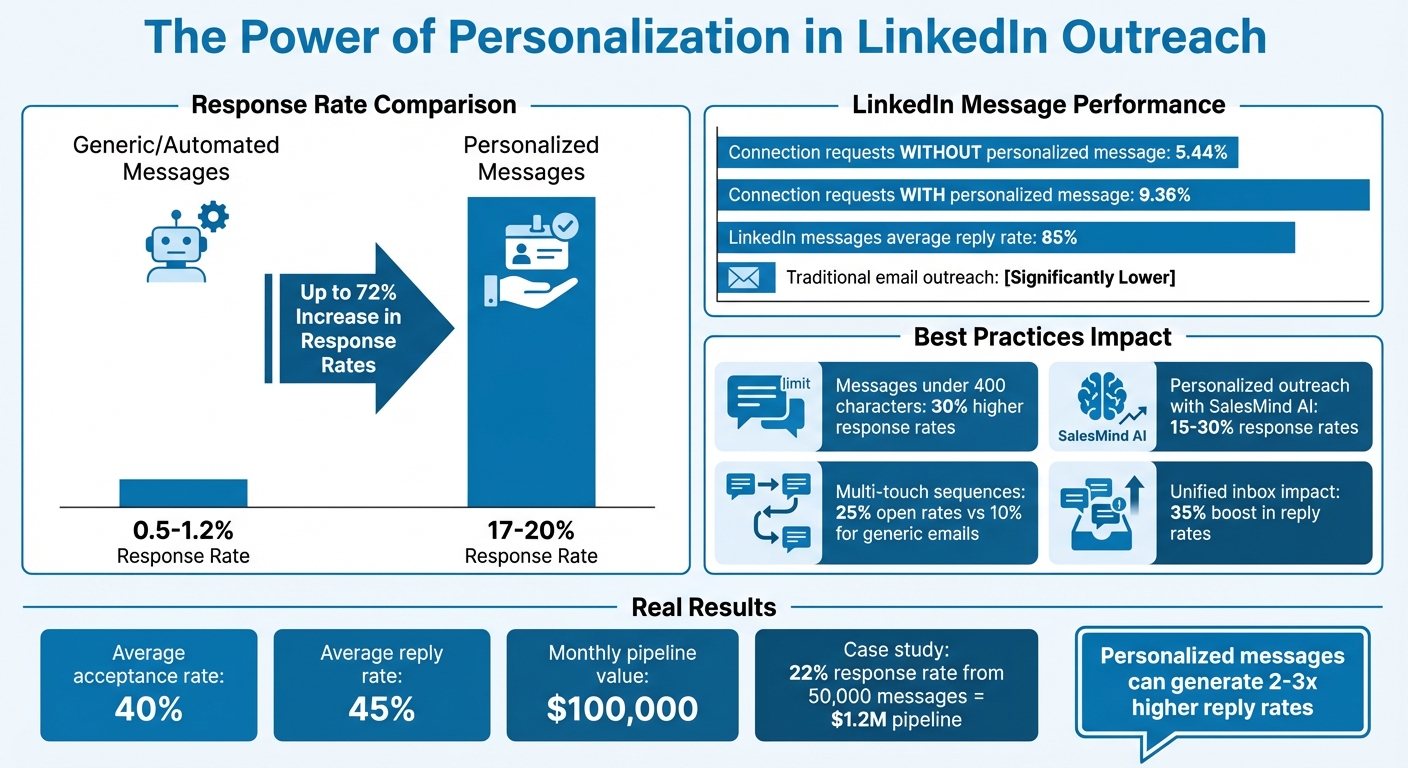
With these limits in mind, personalization becomes a key strategy for maximizing the impact of each connection request. The numbers speak for themselves: adding personalized connection requests can boost reply rates from 5.44% to 9.36% - a jump of about 72% [6]. LinkedIn messages, in general, also see an impressive average reply rate of 85%, far outperforming traditional email outreach [8].
"If you aim to initiate conversations or generate leads, always include a short, relevant, and personalized message to significantly boost your chances of receiving a reply. Even 2 well-crafted sentences can make a significant difference." – Yuriy Boyko, Head of Account Management, Belkins [6]
While generic, automated messages often yield disappointing reply rates as low as 0.5–1.2%, personalized outreach can achieve much higher rates, ranging from 17% to 20% or more [7]. This approach shows recipients that you’ve taken the time to understand them, turning what might have been a cold, impersonal interaction into a more meaningful and engaging conversation [7][8].
sbb-itb-817c6a5
How to Research Prospects for Personalized Messages
Using Profile Information for Personalization
A prospect's LinkedIn profile can be a goldmine for crafting personalized and engaging messages. Start by reviewing their job title, career trajectory, and any posts or comments they've shared. For instance, if they've recently stepped into a new role, they might be focused on making a strong impact right away. Their recent activity often highlights topics they care about, giving you a natural way to start a conversation.
The "About" section and featured content can also reveal a lot about their professional interests and accomplishments. Many professionals showcase certifications, awards, or significant projects here. Referencing these specifics not only shows you've done your homework but also signals genuine interest. As Daniel Saks, CEO at Landbase, puts it: "Effective personalization goes beyond inserting a prospect's name - it requires researching their recent activity, understanding their challenges, and crafting messages that demonstrate genuine value" [9].
To take it a step further, don't just stop at individual details. Explore mutual connections and company updates to add depth to your outreach.
Referencing Mutual Connections and Company News
Mutual connections can be a powerful tool for building rapport. If you share a connection with your prospect, mention it early - ideally within the first 50 characters of your message. This ensures it appears in their notification preview, making your outreach feel warmer and more familiar. Tools like LinkedIn Sales Navigator's TeamLink feature can help identify colleagues who might even facilitate an introduction. For more tactical advice, see this LinkedIn outreach FAQ.
Company news and updates are equally valuable for personalization. Scanning recent press releases, earnings reports, or executive interviews can provide insights into their current priorities. For instance, if you're reaching out to someone in the C-suite, referencing a publicly stated goal or challenge shows you’ve done your research and understand their focus areas. Personalized messages that weave in at least three elements - such as mutual connections, company milestones, and specific role-related insights - tend to perform much better. This approach highlights the importance of thorough preparation, especially when managing high-volume campaigns with AI best practices [9].
Building Message Templates That Scale
Parts of an Effective LinkedIn Message
Once you've done your homework on your prospects, the next step is creating LinkedIn messages that can scale without losing their personal touch.
A strong LinkedIn message has three key ingredients: a personalized opener, a clear value proposition, and a direct call-to-action. Start with something personal, like referencing a recent post they shared or a milestone their company hit. This shows you're paying attention and adds a human element to your outreach. Next, your value proposition should focus on what they stand to gain, keeping it short - just one or two sentences. Finally, wrap it up with a simple call-to-action, such as, "Would you be open to a quick 15-minute call?"
Keep your messages under 400 characters to make them easy to read on mobile. Messages within this limit enjoy up to 30% higher response rates compared to longer ones [1][2].
Here’s an example of how this could look:
"Hi {{FirstName}}, loved your post on {{RecentActivity}} - it's so relevant to {{CompanyIndustry}} challenges. At [YourCompany], we've helped similar teams {{ValueProp}}. Open to a quick chat? Best, {{YourName}}."
This kind of template often achieves response rates between 15% and 25% for LinkedIn outreach [3]. By following this structure, you can automate personalization effectively while still making each message feel tailored.
Now, let’s dive into how dynamic variables can make this process even more efficient.
Using Dynamic Variables for Personalization at Scale
Dynamic variables are a game-changer for scaling LinkedIn messages while keeping them personal. These placeholders - like {{FirstName}}, {{JobTitle}}, or {{RecentPost}} - automatically fill in specific details for each recipient. Instead of manually inputting names or company info, you let the system do the heavy lifting. The result? Messages that feel tailored without the time-consuming effort.
Key variables such as the recipient's name, recent activity, or mutual connections can significantly boost engagement. For example, in January 2024, Zapier used dynamic variables to send 50,000 messages, achieving a 22% response rate and generating $1.2 million in pipeline revenue [source: Outreach.io Customer Stories, March 2024].
To avoid sounding robotic, limit yourself to three or four variables per message. Focus on what truly matters - like referencing their latest post or a shared connection - rather than overloading the message with personalization tokens. Tools like SalesMind AI make this process seamless. You can import leads through a CSV file or LinkedIn integration, insert variables into a template, and preview how each message will appear before hitting send. This method ensures your messages maintain a human-like tone while scaling to thousands of prospects [2][4].
How I Automated LinkedIn DM Outreach with 2x AI Agents (Free Template Included)
Using SalesMind AI for Automated Outreach
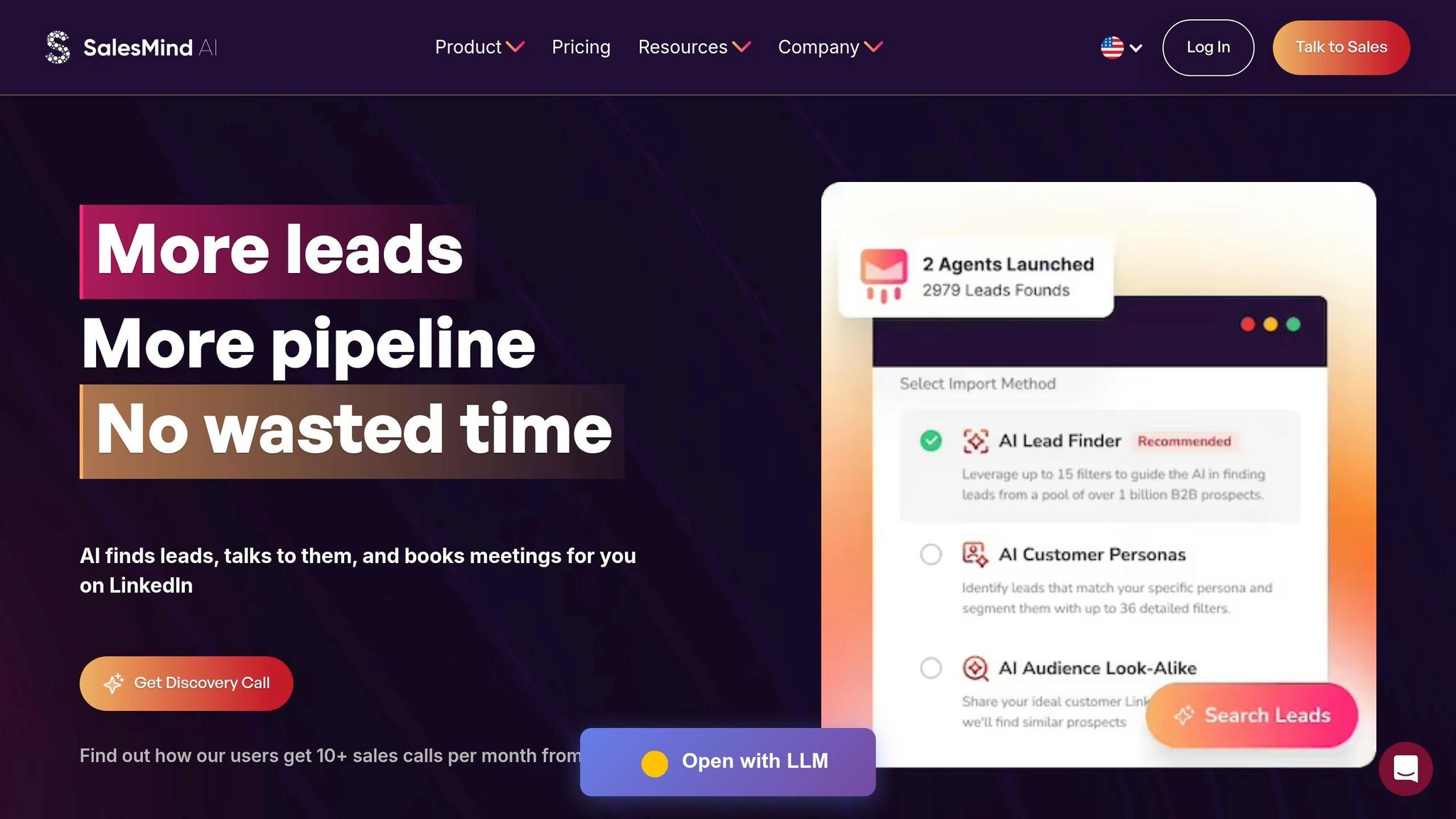
Once you've created message templates with dynamic variables, you can pair them with automation to scale your outreach efforts without losing the personal touch. SalesMind AI blends AI-driven personalization with smart automation, enabling you to connect with hundreds of prospects while keeping your communication tailored and engaging.
Audience Segmentation and Lead Scoring
Before sending out any messages, it’s crucial to identify which prospects are worth your time. SalesMind AI allows you to segment your audience based on factors like job titles, industries, company size, or location. For instance, you can target CTOs in fintech companies with 50–200 employees and craft messages that address their specific concerns, such as tech innovation and security challenges.
The platform's AI-driven lead scoring takes this a step further by assigning a score to each prospect. This score factors in profile engagement, mutual connections, recent activity, and firmographic data like revenue potential. High-scoring leads - such as decision-makers at companies earning over $10 million annually - are automatically prioritized. This helps your team focus on prospects with 3x higher conversion potential compared to an unsegmented approach.
"The concept as well as the automation are good and I like that it shows you a score on what the lead suitability with your filters is", says Jure Grabljevec, CEO of Jure Design [10].
One B2B sales team using SalesMind AI expanded their outreach from 50 to 500 weekly messages while maintaining a 22% response rate, well above the industry standard of 5–10%. Thanks to the lead scoring feature, they filtered out 60% of low-potential prospects, allowing them to focus their efforts where it mattered most. This approach ensures your outreach stays both efficient and personal.
Automating Personalized Messages and Follow-Ups
SalesMind AI’s personalization engine pulls data directly from LinkedIn profiles to craft messages that feel genuinely tailored. Using dynamic variables like {{first_name}}, {{recent_post}}, and {{company_news}}, the AI generates messages that feel hand-written. For example: "Hi {{first_name}}, loved your post on {{recent_post}}."
The platform also automates multi-touch follow-ups, sending messages at optimal intervals. A typical sequence might include a helpful tip on Day 3 and a case study link on Day 7, with a maximum of five touches to avoid overwhelming the prospect. These sequences achieve 25% open rates, compared to just 10% for generic mass emails. By prioritizing precision and relevance, you’ll see noticeable improvements in both engagement and response rates.
Unified Inbox and Real-Time Analytics
SalesMind AI’s unified inbox brings all your LinkedIn messages, replies, and multi-channel responses into one centralized dashboard. The AI assists by suggesting responses, organizing conversation threads, and flagging stalled conversations that need manual follow-ups. This streamlined setup eliminates the need to switch between apps and significantly reduces response times, boosting reply rates by 35%.
The platform also offers real-time analytics to track key metrics like open rates, reply rates, connection acceptances, and meeting conversions. You can analyze performance by audience segment or message variant. For example, targeted messages tailored to specific industries might achieve a 28% reply rate, while generic messages only manage 12%. You can also A/B test variables, pause underperforming campaigns, and use AI-generated insights like "Increase personalization on {{industry}} leads for +15% uplift."
"SalesMind AI has proven very useful to our sales team in reducing the massive pain points of manually tracking each and every lead interaction", says Rahul Pushkarna, Senior Advisor at Bounty Media [10].
With its cloud-based functionality, SalesMind AI keeps your campaigns running without needing to keep your browser open. Advanced scheduling and daily limits ensure compliance with LinkedIn’s restrictions. Users report an average 40% acceptance rate and 45% reply rate, generating a monthly pipeline value of approximately $100,000 [11].
Setting Up Multi-Touch Sequences and CRM Integration
Creating Multi-Touch Outreach Sequences
Multi-touch sequences are all about keeping prospects engaged over time without overwhelming them. These sequences space out interactions over several days, giving prospects breathing room while keeping your outreach relevant. Start with a connection request that mentions something specific from their profile - this personal touch can make a big difference. If they accept but don’t respond, follow up with something valuable, like an industry insight or a helpful resource. Later, you might share a brief case study or success story that addresses a challenge they’re likely facing.
The key here is to offer value at every step, not just push for a meeting. For instance, one follow-up could include a timely article about an industry trend, while another might provide a useful tool or template. This way, you stay on their radar without being intrusive. Plus, platforms can automate these follow-ups based on how prospects engage, ensuring your messages are always timely and relevant.
CRM Integration for Lead Management
Pairing automated outreach with CRM integration takes your lead management to the next level. Syncing your LinkedIn outreach with a CRM helps centralize all your lead data, making personalized engagement scalable. For example, when you connect SalesMind AI to your CRM, every accepted connection or reply automatically updates or creates a lead record. This means your team can easily access the entire conversation history, engagement details, and next steps - all in one place.
You can also map LinkedIn profile details, like job titles, company names, and URLs, directly to CRM fields. Set up automation rules to create new lead records when a connection request is accepted or assign leads to specific team members when a prospect replies.
Want to prioritize your efforts? Automated scoring can help. For instance, a prospect who accepts your connection, engages with multiple messages, and clicks on a shared link will rank higher than someone who only accepts your request. This scoring system helps your team focus on the leads most likely to convert. Before you roll this out, make sure to test the data flow and train your team on how to use the synced LinkedIn data effectively.
Tracking Metrics and Improving Your Campaigns
Key Metrics to Track
When you're building personalized outreach campaigns, tracking the right metrics is critical to improving over time. These metrics tell you what's working and what needs adjustment. Focus on three main ones: acceptance rate (percentage of connection requests accepted), response rate (how many messages get replies), and conversion rate (how many prospects move to actual sales conversations or meetings). Unlike broader marketing metrics like traffic or impressions, these focus on direct engagement and relationship-building[1][2].
Set clear and specific goals to stay on track. For example, aim for a 15% response rate, with 40% of those replies indicating qualified interest, within 60 days[1]. Start by documenting your current performance. If your response rate is 8%, setting a goal to reach 12% represents a measurable and ambitious 50% improvement.
Break your metrics down by funnel stage:
- Top of the funnel: Track acceptance rates and profile views.
- Middle of the funnel: Monitor response rates and the quality of conversations.
- Bottom of the funnel: Measure conversion rates to qualified leads and closed deals[2].
Don't overlook follow-up success rates, which track responses to second or third messages. For instance, while a 25% acceptance rate might be acceptable early on, you'd want a 40%+ response rate from prospects already engaging with your messages.
To streamline this process, integrate your outreach tools with a CRM to track LinkedIn analytics. This allows you to automatically log interactions and track follow-ups efficiently[1]. Tools like SalesMind AI can help by offering real-time analytics and a unified inbox tailored for LinkedIn outreach. With automated weekly reports, you can keep an eye on key metrics, spot trends, and address issues quickly instead of waiting weeks to identify problems.
Finally, while numbers are important, qualitative feedback from prospects can provide deeper insights into why certain strategies succeed or fail.
Using Feedback to Improve Your Outreach
Metrics give you the "what", but feedback reveals the "why." Pay attention to prospect responses to uncover common objections, questions, or interests. For example, if multiple prospects ask about pricing before you’ve mentioned it, it might be time to address value earlier in your messaging[5]. Regularly review responses to identify patterns - this helps you refine your approach and avoid mistakes that might be turning people away.
Engage directly with prospects by asking questions like, “What made you respond to this message?” or “What could have made this outreach more relevant to you?” Use their answers to fine-tune your templates and improve personalization[2].
Experimentation is another key to improvement. Test different message variations to see what works best. For instance, you could compare a question-based opening to a value-driven statement or test whether shorter messages lead to higher response rates. Make sure to test each version with 50-100 responses to get meaningful results. Once you find a winning strategy, apply it to larger prospect lists.
Set performance thresholds for your campaigns based on benchmarks. For example, if your average response rate is 10% but a campaign drops below 5%, dig into the cause before pausing it[12]. Try tweaking the message, adjusting your targeting, or changing the timing. If things don’t improve after a couple of iterations, pause the campaign and decide whether to improve or scrap it altogether. Label underperforming campaigns as either "Improve" (if they show potential) or "Remove" (if they’re completely off-target)[2]. Document these lessons to avoid repeating mistakes.
Finally, track revenue attribution to measure the long-term value of your LinkedIn outreach. Use your CRM to tag closed deals with the campaign or message that initiated the relationship. This lets you calculate metrics like cost-per-qualified-lead and customer lifetime value. By connecting results to your outreach efforts, you can avoid prematurely abandoning strategies that might take longer but deliver high-quality leads.
Conclusion
Scaling LinkedIn outreach can still feel personal, even when expanding your efforts. The secret lies in blending automation with personalization, which has been shown to deliver 15-30% higher response rates than standard, one-size-fits-all messages[1][5]. Striking this balance ensures you connect with more prospects without losing the human touch.
SalesMind AI makes this process easier by automating repetitive tasks while keeping your messages personal. It uses dynamic variables to pull in key profile details, helping you craft tailored messages for each recipient. Features like an AI-powered unified inbox and real-time analytics allow you to step in at the right moments, making every interaction feel genuine[1].
This combination of efficiency and personalization doesn’t just save time - it delivers results. Personalized outreach can generate 2-3x higher reply rates compared to generic messaging[1][5]. With tools like audience segmentation, lead scoring, and automated follow-ups, SalesMind AI can scale your outreach by 10x while maintaining quality. According to B2B sales benchmarks, these features can increase conversion rates by up to 25%[2][5].
To get started, try running a multi-touch sequence with SalesMind AI on 100 prospects. Monitor your response rates weekly and use its analytics tools to fine-tune your strategy. Over 90 days, this approach could lead to measurable improvements in personalization and pipeline quality, potentially increasing results by 20-50%[1][5].
FAQs
How many LinkedIn connection requests can I safely send per day?
To stay within LinkedIn's guidelines and avoid restrictions, aim to send around 15–20 connection requests per day. Over a week, this should total between 80 and 100 requests. If you're using a new or previously inactive account, it's best to start slow and gradually increase your activity to maintain compliance.
What should I personalize first to boost replies fast?
To get faster replies, make your outreach personal. Mention something specific about the prospect - like a recent post they shared or a mutual connection. This adds relevance to your message and shows you're genuinely interested, which naturally encourages more engagement. Tools such as SalesMind AI can help by automating the research process and creating customized messages, allowing you to stay personal without sacrificing efficiency.
How do I automate follow-ups without sounding spammy?
To automate LinkedIn follow-ups without coming across as spammy, prioritize personalized and meaningful messages. Tools like SalesMind AI can help craft outreach tailored to individual profile details, recent activity, or interactions with content. Spread out your follow-ups - between 4 to 7 messages - over a reasonable period and trigger them based on specific actions, like when someone views your profile. This approach keeps your communication relevant, increases response rates, and ensures you stay genuine without overwhelming your prospects.